
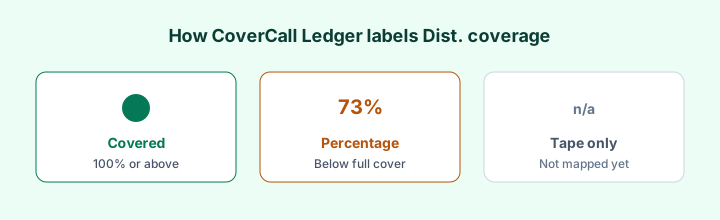
CoverCall Ledger’s Dist. coverage column looks simple — Covered, a percentage, or not published yet. This walkthrough explains each label so you can read the coverage table and fund pages without treating them as buy/sell ratings.
The three states you will see
1. Covered (100%+)
Period profit from the mapped financial statements was at least as large as distributions paid (accrual basis, including unrealized gains while holdings are still owned). Example: HMAX and ZWB for 2025.
2. A percentage (for example 88% or 73%)
Earned ÷ paid for that filing year. Example: HHIS at 88%; QYLD at 73% for its FY Oct 2025 window. Below 100% means distributions exceeded accrual earnings for that period — not that the fund “failed,” and not a tax characterization.
3. Not published yet / tape only
No mapped MRFP / annual FS / N-CSR for the coverage year yet — or a new launch before the first annual. The page still shows last distribution, price, and 2026 YTD from the exchange tape. Dist. coverage stays blank until a filing is mapped. We do not invent a percentage from yield.
What opens when you click a preview row
- Filing-period total return (issuer unit return for the statement year, when mapped)
- Earned, paid, and related statement line items
- Links to issuer page / source filing when we have them
Email unlock expands the on-site table in your browser — still free, not an account. It does not create coverage numbers that were never mapped.
Covered vs “Partly covered” status chips
Some fund profiles also show a status label (Covered / Partly covered / Not covered this period). Treat Dist. coverage % as the primary numeric lens; status is a summary chip and can feel blunt near 98–100%. Prefer the earned vs paid figures on the fund page.
Tape fields that are not Dist. coverage
- Last distribution and approx. yield — income rate, not coverage
- Cash YTD / Reinv. YTD — 2026 price + distributions from the Dec 31, 2025 close
- AUM — snapshot, not a live feed
Worked path
1. Sort the table by Dist. coverage.
2. Open HHIS (percentage), HMAX (Covered), and a tape-only name if present.
3. Read What is distribution coverage? and How to read an MRFP for coverage.
Not investment advice. Confirm every figure against issuer documents.